

Orion TV
Make TVOrion TV is an Android media app from Make TV that combines live channels, on-demand content and personal playlists in a single interface. It supports external players, customizable channel lists and an electronic program guide (EPG) for browsing and scheduling.
Screenshots


About this app
Orion TV is an Android app from developer Make TV, listed in the Media & Video category and described in this profile as version 5.5.0. It brings broadcast-style navigation to a phone or tablet by gathering live channels, on-demand shows and personal playlists in one place, so users can move between live programming and recorded content without leaving the app.
Live channels, on-demand content and playlists
The app is designed to aggregate IPTV-compatible streams, video-on-demand libraries and local media. Users can import M3U, XSPF or remote playlists to shape the list of available channels, and playlist management accepts both local files and remote URLs. Live channels and on-demand episodes appear together in one library, which keeps the two types of viewing in the same interface.
Navigation and interface
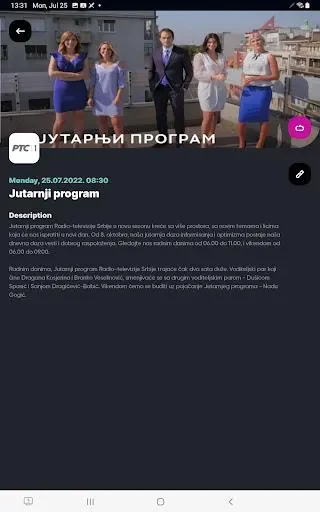
The layout centers on a main channel list, a category filter and a player overlay. Thumbnails and program descriptions are meant to load quickly, and swipe gestures together with short menus are intended to reduce the number of taps needed to move between sections. The source states that the interface suits touch devices and can also be navigated with a remote on smart TV boxes.
Playback, players and performance
Playback can be handed to an external media player, which the source suggests for files that need advanced codecs or formats. Buffering options let users balance startup speed against stability. Where available, the app offers adaptive stream selection, and its settings cover buffer size, hardware acceleration and audio output. Subtitle and audio track selection lets users switch languages or enable external subtitle files during playback.
Customization, parental controls and PIN lock
Users can rename channels, build favorites lists and create folders for quicker access. Account settings include parental controls that restrict whole categories or individual channels, and the app can be locked with a PIN.
Program guide, recording and casting
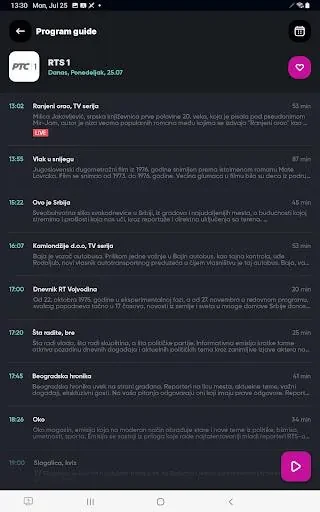
The electronic program guide lets users browse schedules, set reminders and jump to upcoming broadcasts. From the guide, recordings can be scheduled, and stored streams can be played back later through the catch-up feature. Live channels and on-demand content can also be cast to a TV using Chromecast or DLNA.
Getting started
Setup involves installing the APK and granting the permissions needed for storage and network access. Users then import a playlist or connect to a provider and scan the EPG to populate program information. The source notes that the app guides new users through playlist import and player selection. For streams that stutter, the source suggests trying a different external player, and it recommends creating favorites folders early and checking Wi-Fi and mobile data settings to avoid unexpected usage.
Version history
View all15 Oct 2026 · stable
Frequently asked questions
Does Orion TV come with its own channels or content?
The description says Orion TV aggregates IPTV-compatible streams, on-demand libraries and local media, and it refers to importing playlists or connecting to a provider. It does not state that the app itself includes channels or content, so users should expect to supply their own playlists or sources.
Which company develops Orion TV?
The supplied listing identifies the developer as Make TV.