

Entergy
EntergyEntergy brings energy account tasks together, including balance and statement viewing, bill payments, outage reporting, usage monitoring, alerts, and service-address management. Customers can also review consumption trends, manage payment settings, and access support resources through the app.
Screenshots
About this app
Entergy brings account management, billing, usage monitoring, and outage information together for customers who need to handle everyday energy tasks from an Android app. It provides tools for viewing statements, checking balances, making payments, reviewing consumption, and receiving service updates.
Handling bills and account details
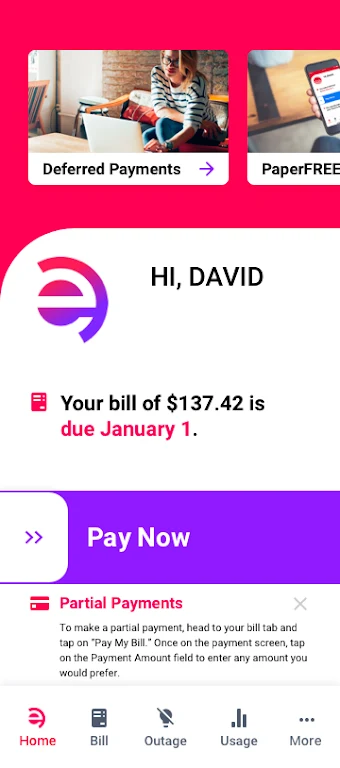
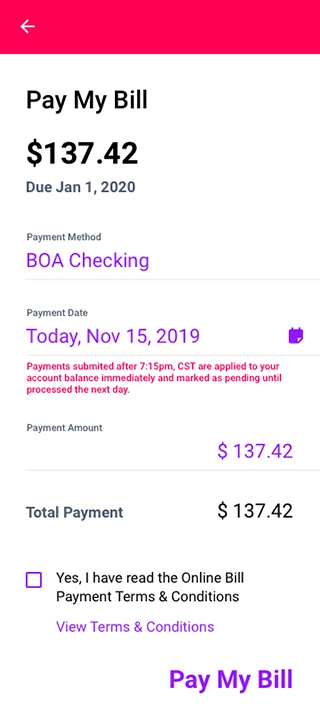
The billing area supports several ways to manage payments. Users can pay with saved cards or bank transfers, make a one-time payment, set up autopay, and create scheduled reminders. Paperless billing enrollment is also available. Eligible customers may have access to payment plans, while stored payment history can help with record-keeping.
Account controls allow multiple service addresses to be added and contact details to be updated. Residential and commercial profiles can be switched from the main screen, which keeps separate service information within the same account experience.
Checking energy use over time
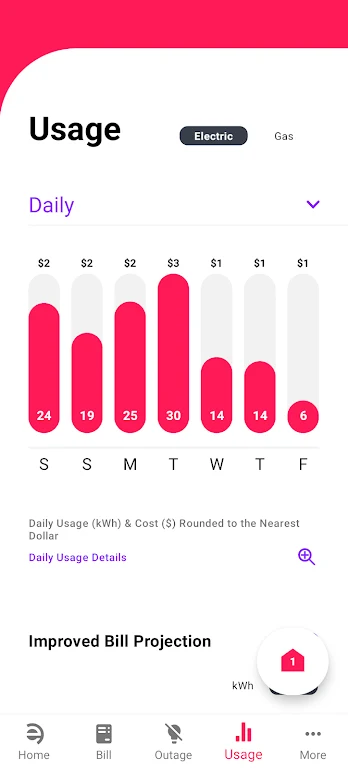
Entergy presents meter readings and consumption information through charts that can be viewed by day, week, or month. Interactive graphs support comparisons between periods and can make unusual increases or higher-use patterns easier to identify. The source also describes estimated cost forecasting for planning around seasonal changes and the next bill.
For customers with smart meters or compatible home energy systems, the app can sync device data for near real-time consumption updates. Depending on the service area, available connections may include meter readings, time-of-use analysis, and energy management system integration. These options can support reviewing off-peak rates and demand-response programs where available.
Reporting outages and following restoration updates
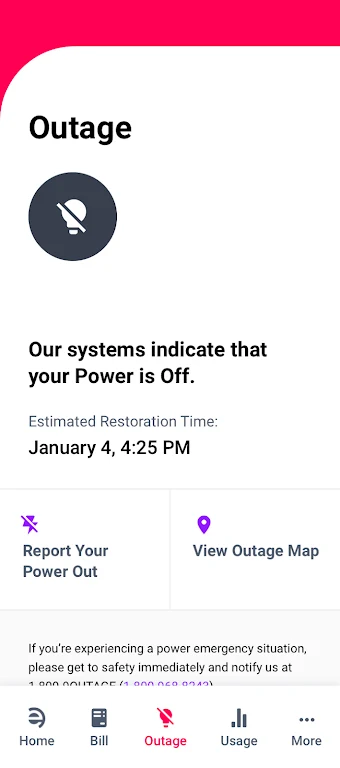
The outage section shows affected areas and restoration timelines when interruptions occur. Users can report an outage through the app, including location information and photos. Push notifications can provide updates about restoration progress, planned maintenance, and safety advisories.
Using alerts and personalized information
Notification settings cover practical account events such as low balances, approaching bill due dates, and unusually high usage. Users can choose notification preferences and data-sharing options. An insights area analyzes historical information and provides profile-based suggestions, including thermostat adjustments, appliance cycling, and avoiding peak hours.
Navigating the app and finding help
The interface groups core actions in a dashboard with large buttons, concise menus, and a searchable help center. Text scaling and screen-reader compatibility are included among the accessibility options. New users are guided through account linking and preference setup during onboarding.
Support resources include frequently asked questions, chat or callback requests, and links to local service representatives. Educational materials explain energy efficiency, rates, and meter data. Business customers can also find information about demand management and service coordination.
Account access and privacy controls
The app describes encrypted logins, optional biometric access, and multi-factor authentication for account access. Customers can adjust notification and data-sharing preferences. To begin, users create or sign in to an account and verify their service addresses; payment methods, notifications, and smart-meter syncing can then be configured according to the available account and service-area options.
Version history
View all15 Oct 2026 · stable
Frequently asked questions
Can Entergy manage more than one service address?
Yes. The app supports adding multiple service addresses and switching between residential and commercial profiles.
Are smart-meter features available to every customer?
No specific universal availability is stated. Smart-meter and home-energy-system integrations vary by service area and require compatible equipment or services.