

Crosshair & Nickname Generator
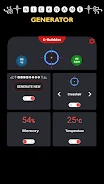
Crosshair & Nickname Generator combines a visual reticle editor with a nickname creator. Customize and preview crosshairs, generate names with styling options, then save images, copy text, or share results through apps on your device.
Screenshots
About this app
Crosshair & Nickname Generator brings together a crosshair editor and a nickname creator for players who want to customize a reticle or prepare a name for a game, stream, or social profile. Choose a module to work on, preview the result, and use the available export options to take it elsewhere.
Adjusting a crosshair for a preferred look
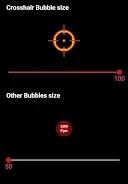
When refining a reticle, the editor provides controls for its shape, size, thickness, gap, opacity, and color. Shape choices include dots, crosses, circles, and hybrids, with options for center indicators and outer markers. A color picker offers presets and custom hex entry, while contrast presets can be toggled when considering visibility against different backgrounds. The preview updates as adjustments are made, so changes can be reviewed during the design process.
For continued experimentation, a favorite design can be locked and loaded as a starting point for variations. Crosshair images can be saved or shared through apps installed on the device. These export options let users keep or pass along a design; the source does not describe the app automatically installing it into a game.
Generating a nickname for a profile
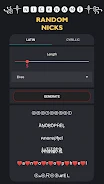
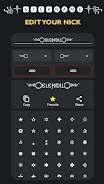
For naming, the builder draws on word banks, templates, and stylistic presets. Suggestions appear in a swipeable carousel and can be based on themes, length, and special-character options. Users can seed the generator with keywords, then refine the output with capitalization, numeric substitutions, or decorative glyphs. Tone filters cover edgy, playful, and professional styles, giving several ways to narrow the suggestions for a team, stream, or social profile.
Favorite nickname results can be pinned to a local list. Once a name is ready, it can be copied as text or shared through an app on the device, making it available for use in games or chat platforms.
Saving results for another session
The two tools have separate outputs: crosshair designs can be saved as images, while nickname results can be copied as text. The description says storage permission may be requested if saving images. It also describes loading a locked crosshair as a baseline and keeping pinned nickname results, supporting continued work with preferred options without treating the tools as an automatic in-game setup process.
Version history
View all15 Oct 2026 · stable